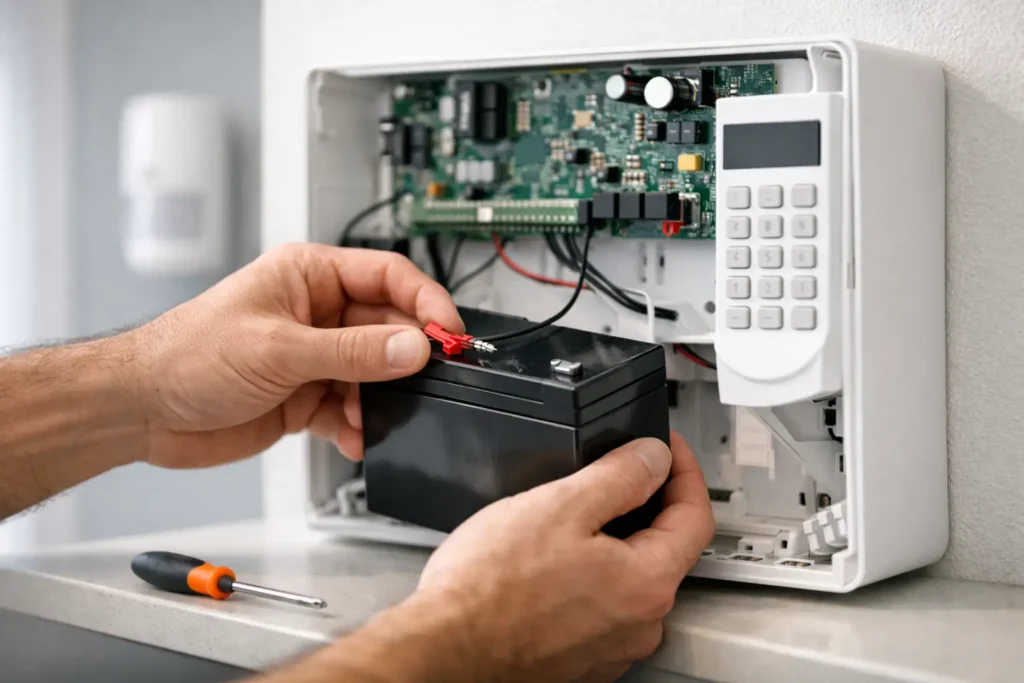
A keypad that chirps at night, a low-battery message that will not clear, or a trouble light on the panel can be more than an annoyance. Alarm panel battery replacement is a routine part of maintaining a professionally monitored security system, and handling it promptly helps ensure your protection continues through a power outage.
Most alarm systems use a rechargeable backup battery inside the main control panel. It takes over when utility power is interrupted, keeping the panel, communication equipment, and connected devices operating for a limited time. Like any battery, it eventually wears out. Replacing it at the right time is a small maintenance task with a meaningful role in your home’s or business’s security.
Why Alarm Panel Battery Replacement Matters
Your alarm panel normally runs on household electrical power. The backup battery is there for the moments when that power is unavailable, whether the cause is a summer storm, an equipment issue, or an unexpected outage. A healthy battery gives the system time to remain armed, communicate alarm events, and continue protecting the property while power is restored.
This matters in Louisiana, where severe weather can bring outages without much warning. It also matters to business owners who depend on dependable opening and closing activity, intrusion protection, and monitoring after hours. A weak battery does not necessarily mean the system has stopped working today, but it does mean the backup layer of protection may not be ready when it is needed.
A low-battery condition can also create recurring keypad alerts. Ignoring those alerts may lead people to silence the sound without resolving the problem. That is understandable, especially when the chirp happens in the middle of the night, but it is better to identify whether the issue is the panel battery, a wireless sensor battery, or another service concern.
Signs Your Alarm Panel Battery May Need Service
The clearest sign is usually a display message such as Low Battery, System Trouble, Battery Trouble, or a similar notification. Depending on the system, the keypad may beep periodically or an app may send an alert. Some systems identify the specific component affected, while others only indicate a general trouble condition.
Battery age is another useful clue. Many sealed lead-acid alarm panel batteries last approximately three to five years, although heat, repeated outages, charging conditions, and system usage can shorten that lifespan. If the battery has not been replaced in several years, a service check is sensible even before a warning appears.
Do not assume every low-battery notice points to the main panel. A door contact, motion detector, smoke detector, glass-break sensor, key fob, or wireless keypad may have its own battery. These devices use different battery types and have different replacement procedures. The wording on the keypad or mobile alert often helps narrow down the source.
What Is Involved in Replacing an Alarm Panel Battery?
The battery is typically located inside the metal or plastic enclosure that contains the alarm control panel. It is commonly a compact, rechargeable battery with red and black lead connections. The replacement needs to match the system’s required voltage, capacity, terminal type, and physical size.
For many systems, battery replacement is straightforward for a trained technician. However, the right approach depends on the equipment, how it is monitored, and whether the panel has a tamper switch or a special communication setup. Opening the enclosure or disconnecting power without understanding the system can create trouble signals, trigger alarms, or cause a communication issue that needs to be reset.
That is why professional service is often the most reliable choice, particularly for monitored systems and commercial properties. A technician can confirm the battery is the actual source of the warning, install the correct replacement, test charging and backup operation, and make sure the system returns to normal status. If a problem remains after the battery is replaced, there may be an issue with the transformer, panel charging circuit, wiring, or communication device.
Before You Replace Anything
If you plan to inspect the situation yourself, begin by checking the exact message on the keypad or in your security app. Record any zone number, device name, or trouble code. Do not remove a battery simply because the system is beeping – the alert may relate to a different device.
For a monitored system, contact your security provider before opening the panel. They can place the account on test if appropriate and advise whether the system requires a service visit. This simple step helps avoid unnecessary dispatch activity and gives you a clear path to getting the problem resolved.
Never substitute a battery that merely looks similar. Using the wrong voltage or connection type can damage equipment or leave the system unable to hold a charge. A new battery should also be properly rated for alarm-system backup use rather than a general-purpose household application.
Why a New Battery May Not Clear the Alert Immediately
A common frustration is replacing a battery and still seeing a trouble message. In many alarm systems, the panel needs time to charge the new battery and run a self-test. Depending on the panel and the battery’s condition when installed, the warning may take several hours or up to a day to clear.
If the display still shows a problem after that period, it should be checked. The issue could be a loose connection, a battery that is not charging, an incorrect replacement battery, or a separate trouble condition that was present all along. Repeatedly resetting the keypad is not a dependable fix because it may only silence the notification temporarily.
For properties with wireless devices, it is also possible to have more than one low-battery condition at once. Replacing the panel battery will not clear a low battery in a window sensor or smoke detector. A service professional can distinguish between these conditions and help avoid replacing parts that are still working properly.
A Better Maintenance Plan for Homes and Businesses
Security maintenance works best when it is planned rather than handled only after a warning appears. Keep a simple record of service dates, including panel battery changes and batteries replaced in wireless devices. For businesses, this record can be especially useful when several employees interact with the system or when a property manager oversees multiple locations.
Pay attention after major storms or extended outages. Once power returns, confirm that the keypad is normal and that no trouble notification remains. If your system includes mobile controls, review alerts there as well. Quick attention after an outage can prevent a small battery issue from becoming a gap in backup protection.
It is also a good time to consider the overall condition of your system. Older panels may still protect the property well, but changing needs can justify an upgrade. Remote arming, activity notifications, video verification, smart automation, and more dependable cellular communication can make everyday security easier to manage. The best solution depends on the age of the equipment, the layout of the property, and how you use the system.
When to Call a Local Security Professional
Call for service when you are unsure which battery is low, the panel continues chirping after a reasonable charging period, the enclosure is difficult to access, or the system reports communication or power troubles. Businesses should also call when an alert affects a fire, intrusion, access-control, or monitored system that employees rely on daily.
A local provider can do more than replace a battery. They can test the panel, review your current protection, verify that monitored signals are communicating correctly, and explain the condition of the equipment in plain language. For homeowners and business operators across Louisiana, Alarm Center Security provides responsive, professional support backed by decades of local experience.
A working backup battery is quiet reassurance: when the lights go out, your security system still has the power to do its job. If your panel is showing a warning or you cannot remember when the battery was last serviced, arranging a professional check now can help keep your property protected when conditions are least predictable.