A code shared with a contractor can stay on a keypad long after the work is done. A phone credential can leave with a departing employee the moment access is removed. That practical difference is at the center of keypad codes versus mobile credentials for homes, offices, rental properties, and small businesses across Louisiana.
Neither option is automatically the right answer for every door. Keypads remain familiar, affordable, and useful when people need dependable entry without carrying a phone. Mobile credentials offer more individual control and clearer activity records, especially when access changes often. The best choice starts with how your property operates on an ordinary Tuesday – not with the newest feature on a spec sheet.
Keypad Codes Versus Mobile Credentials: The Core Difference
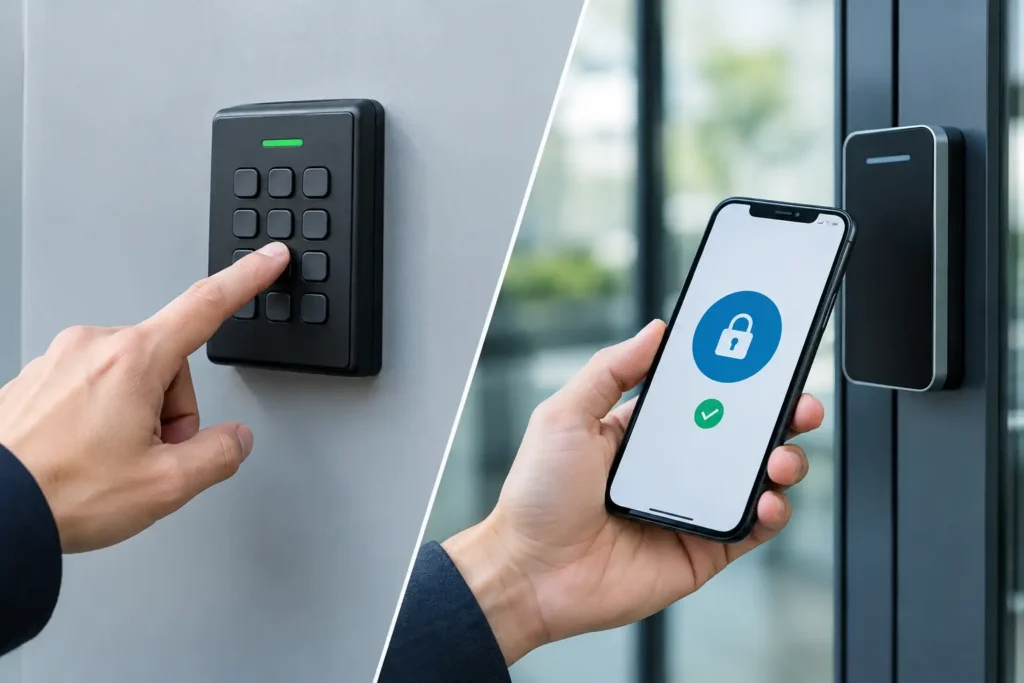
A keypad code is a numeric PIN entered at a keypad mounted near a door, gate, alarm panel, or access-controlled entry. The system verifies the code and grants access or performs a programmed action, such as disarming the alarm. Codes can be assigned to individual users, although some systems may also use shared codes for a household or team.
A mobile credential turns an authorized smartphone into an access credential. Depending on the system and configuration, a user presents their phone near a reader or uses a secure app-based method to gain entry. The credential is tied to that person rather than to a number they may share, write down, or forget to remove.
Both can be professionally managed as part of a larger security plan. Both can also create a record of entry events when configured through a compatible access control platform. The difference is how people prove they have permission to enter.
Where Keypad Codes Still Make Sense
Keypads have stayed popular for good reasons. Most people understand how to use one immediately. A family member, employee, delivery team, or cleaner does not need to download an app, charge a phone, or learn a new process before entering.
For a home, individual alarm codes can help parents know when children arrive from school or when a trusted service provider enters during a scheduled appointment. For a business, a keypad at a staff entrance can be a practical option for teams that do not use company-issued smartphones or work in environments where phones are not always convenient.
Codes are also valuable as a backup. Phones can run out of battery, get left in a vehicle, or suffer a damaged screen at the wrong time. A properly managed keypad gives authorized people another way in without compromising the entire access plan.
The limitation is accountability. If several people use the same code, the event history may show that code was used but not necessarily which individual entered it. Shared codes also tend to outlive their purpose. A former employee, former tenant, or contractor may still know the number unless someone changes it promptly.
Why Mobile Credentials Appeal to Growing Teams
Mobile credentials are especially useful when access needs to follow the person, not the building. An office manager can issue a credential to a new employee, limit it to certain doors or hours, and remove it when employment ends. There is no need to collect a physical card or change a code used by other team members.
That control matters for businesses with turnover, multiple locations, restricted storage areas, or employees who work different shifts. A restaurant owner may want kitchen staff to enter through one door before opening, while managers retain access to an office or cash room. A property manager may need to give maintenance personnel temporary access without handing over a master key.
For homeowners, mobile credentials can be helpful at side gates, garages, or smart entries used by adults in the household. They reduce the temptation to hide keys and allow access to be removed quickly when household circumstances change.
Mobile access does require a little more planning. Users need compatible phones, notification settings and permissions may need attention, and every authorized person should understand what to do if their phone is lost or replaced. A professional installer can help establish those procedures before the system goes live.
Security Is About Management, Not Just Technology
A keypad is not insecure simply because it uses numbers, and a mobile credential is not secure simply because it uses a phone. Security depends on the policies around each method.
With keypad codes, every regular user should have a unique code whenever possible. Avoid simple patterns such as birthdays, addresses, or 1234. Remove codes as soon as a worker leaves, a tenant moves out, or a temporary job ends. If a code was shared, replace it rather than assuming it will remain private.
With mobile credentials, establish clear rules for lost phones, employee departures, and device changes. Phones should be protected with a screen lock, and access administrators should be limited to trusted people. Review access activity periodically instead of waiting until there is a problem.
For either approach, the physical door, lock hardware, reader placement, camera coverage, and alarm monitoring plan still matter. An access system cannot compensate for a weak door frame or an unmonitored side entrance. The strongest protection comes from designing the full system around the property.
Choosing the Right Method for Your Property
Start with the people who enter and the situations they encounter. A family with children, grandparents, housekeepers, and occasional service calls may benefit from keypad codes at the alarm panel, with mobile control available to the adults managing the home. A small office with stable staff may find individual codes work well, particularly if a supervisor reviews opening and closing activity.
Mobile credentials often become more attractive when access changes frequently or when specific doors need different permissions. They can reduce the administrative burden of rekeying, recovering cards, or changing a shared PIN after every staffing change. They also provide a more direct connection between an entry event and an assigned user.
A combination approach is often the most practical. Mobile credentials can serve as the primary method for staff, while a keypad remains available for backup access or approved visitors. At a residence, a smart access system may pair mobile control for homeowners with separate temporary codes for trusted guests and service providers.
There are operational details to settle before installation. Consider whether visitors need entry without a smartphone, whether employees are permitted to use phones at work, how access will work during internet disruptions, and who has authority to add or remove users. Those answers shape a system that works reliably after installation day.
Professional Setup Prevents Common Gaps
Access control can look simple from the outside: mount a keypad or reader, assign users, and open the door. The real value is in the details. Doors must close and latch correctly. Credentials need the right schedules. Cameras should capture the approach and entry point. Employees and family members need a clear, easy explanation of how to use the system.
Alarm Center Security has helped Louisiana property owners protect homes and businesses since 1985. A local security professional can assess your entry points, understand your daily routines, and recommend whether codes, mobile credentials, or a combination will give you the right balance of convenience and control.
If you are planning a new system, expanding a business, or tired of wondering who still has access to your property, ask for a professional security assessment and free estimate. A well-planned access system should make the right people feel welcome while keeping everyone else outside.